In this article
WordPress for Business in 2026: Why It Still Wins (and When It Doesn’t)
Tech & Infrastructure
You can build almost anything on WordPress. The real question is whether it will be cheaper and simpler to live on for the next few years. A working developer’s honest take on when WordPress for business wins, when it loses, and what it really costs to run.

Key takeaways
In 2026, is WordPress still the rational choice for a business, by the money and by the engineering? Here are the short answers, then the full reasoning.
| Takeaway | The short version |
|---|---|
| The real cost shows up after launch | Launch is a one-time event. The next hundred small changes are where the budget actually goes. |
| WordPress wins on the cost of change | It rarely wins on the price of the first release. It wins on the price of the next hundred edits. |
| Ownership is accounting, not ideology | Self-hosted WordPress means you control the code, content, and database. That matters most when content is an asset, not a campaign. |
| One label, very different products | Two sites “on WordPress” can differ more than the business imagines. One is a theme and forty plugins. One is a custom theme with controlled integrations. |
| It is a genuinely bad fit sometimes | For complex SaaS, realtime products, or systems where content is a side effect, WordPress as the core is false economy. |
| Business needs the self-hosted engine | WordPress.org is the engine you run. WordPress.com is a hosted service with its own limits. Business almost always wants .org. |
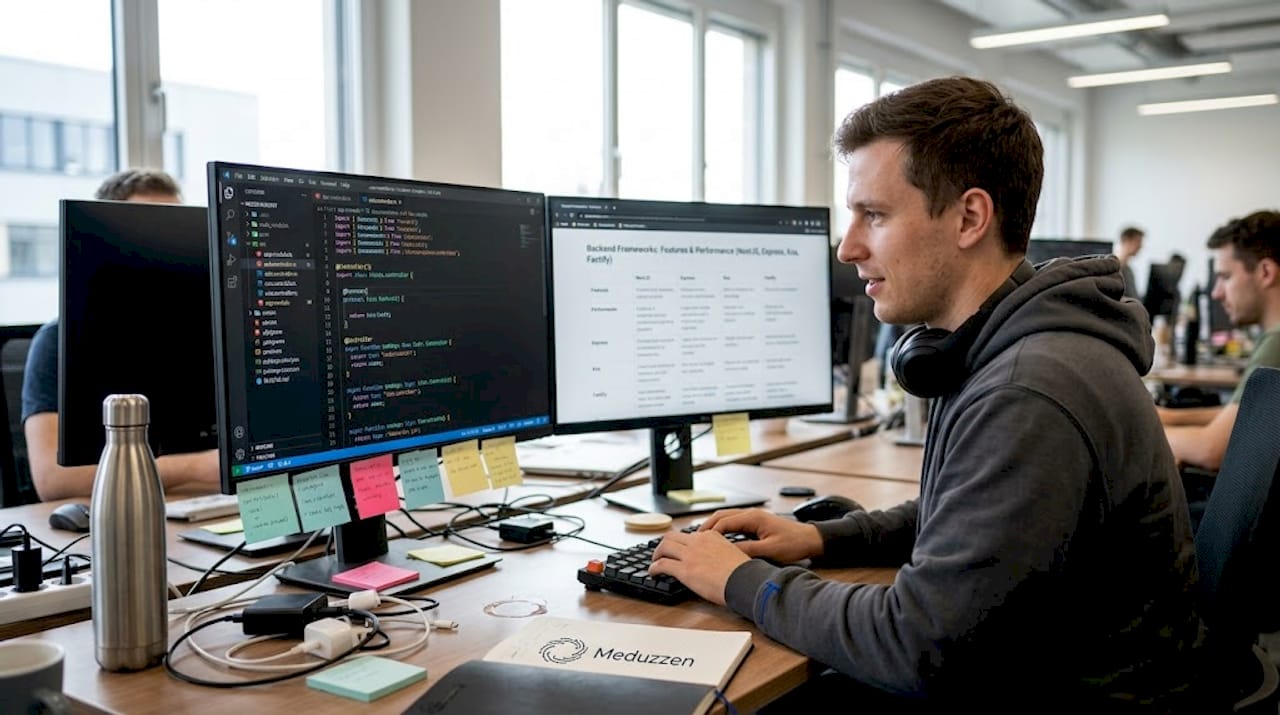
I build and maintain business sites for a living. Corporate sites, stores, booking forms, client mini-sites. Most weeks I am not launching something new. I am changing something that already exists, for the tenth or the fiftieth time. That is the part of this job nobody puts in the sales deck, and it is exactly the part that decides whether a platform was the right call.
So this is not another “what is a CMS” explainer, and it is not a release-notes tour. I want to answer a narrower question. In 2026, when is WordPress for business still rational, by the money and by the engineering, and when is it not.
The conversation that goes wrong
Platform debates go wrong because everyone is defending a different kind of site and calling it by the same name.
Here is a scene I have watched play out on a dozen projects. A company has decided to build a site. The budget is roughly set. Someone even has the design in their head. Everything feels calm.
Then the conversation drops into tools. One person wants a builder, because it is fast and needs no developers. Another wants a custom front end on a fashionable stack, because “that is what serious companies do now.” A third says WordPress almost by reflex. And at that point the argument stops being about the business and starts being about labels.
The confusion starts earlier than anyone notices. For one person a “site” is five pages and a contact form. For another it is an SEO hub that has to grow for years. For a third it is a store with sales rules that do not exist in any template. Until that is named out loud, arguing about WordPress versus Wix versus a custom build is pointless. Three people are picturing three different products.
The useful question is almost never “can we build this on WordPress.” Almost always, yes, you can. The question is whether it will be cheaper and simpler to live on for the next few years. That is the whole article, so let me take it apart.
Is WordPress still worth discussing? The market-share reality
Whenever people argue about WordPress, statistics come out. One camp waves the share around as proof it is best. The other says it dipped a point, so the platform is finished. Both readings are lazy. Numbers show you the scale of an ecosystem. They do not settle a verdict from one percentage point.
Read honestly, here are the current figures. According to W3Techs (24 July 2026), WordPress runs 41.2% of all websites in their sample and 59.1% of sites with a known CMS. The correct number is not the “43% of the web” everyone still repeats out of habit. That was the 2025 peak. The share is trending down for the first time in a decade, mostly at the entry level, where Shopify (about 7.6% of CMS) and Wix (about 6.1%) are taking the simpler projects.
| CMS | Share among known-CMS sites (W3Techs, 24 Jul 2026) |
|---|---|
| WordPress | 59.1% |
| Shopify | 7.6% |
| Wix | 6.1% |
| Squarespace | 3.5% |
| Joomla | 1.7% |
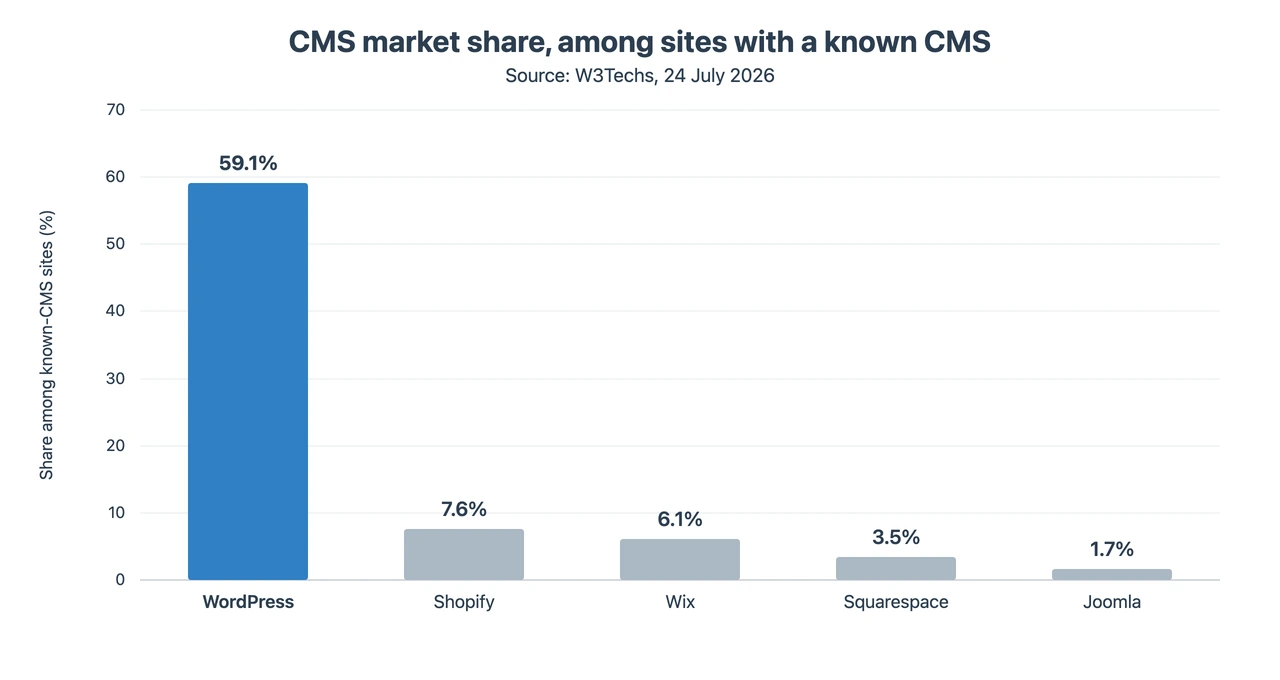
For a business, the size of that lead is not proof WordPress is “the best.” It is an argument about operational risk. A platform with this share carries a secondary economy: managed hosting, security products, plugins, agencies, ready integrations, and a huge record of how things break and how they get fixed. That is not a nice bonus. It is a lower cost of keeping the project alive.
The practical version is dull. It is easier to find someone to maintain the site, and easier to replace a vendor who disappears, burns out, gets more expensive, or moves on. You are far less likely to end up alone with an exotic stack that had one living expert on earth. The dip from about 61.0% of CMS a year ago to 59.1% today is a reason to compare the alternatives soberly, not to declare the platform dead.
The real argument: the cost of living of a website
WordPress often wins not on the price of the first release, but on the price of the next hundred changes. The most common sentence at the start of a project is “we just need a site on WordPress.” It sounds clear, and it hides a set of expectations that do not always fit together. Someone wants cheap and fast. Someone wants unique and beautiful. Someone, six months later, wants a store, a booking flow, an account area, or a landing page for a new product. They all mean the launch. The expensive part is the life of the site after release, the part almost no comparison article prices.
Consider three quotes on the same brief. A builder like Wix or Webflow is faster and cheaper to launch. WordPress is noticeably more. A custom front end on a modern stack is more again. On paper the choice looks obvious: take the cheapest and “figure it out later.” Industry data backs up how low that entry point looks. GoodFirms reports that 59.9% of agencies deliver basic sites and MVPs for $1,000 to $3,000. A proper self-hosted WordPress build sits higher, commonly $5,000 to $12,000 at a small agency and $15,000 to $25,000 at a mid-market one (GoodFirms 2026 survey data). On timelines, a mid-market custom-theme build typically takes about 9 to 14 weeks, and a custom WooCommerce store 15 to 24 weeks.
Then the changes start. A month in, a request form. Two months in, a second language. Then a CRM connection, a couple of landing pages, a redesigned block on the home page, a services catalog, a careers section, an SEO area. None of these looks like a “big project” on its own. Over two or three years they add up to the real cost of owning the site, and the launch price stops being the number that matters.
Where does each stack put the cost of change? On a builder, every complication runs into the pricing tier or the platform ceiling. On a full custom build, an ordinary text edit still often passes through an engineer. On WordPress, typical edits live in the admin panel, and development plugs in only when something genuinely non-standard shows up.
The ongoing side is where the honest numbers live. For a mid-market corporate site at around 100,000 visits a month, first-year total cost of ownership is not the build price. On top of a $35,000 to $55,000 custom-theme build, expect managed hosting near WP Engine’s Growth plan at $109 a month or Kinsta’s Business tier at $115 a month, $350 to $600 a year in premium plugin licenses, and a maintenance retainer of roughly $1,000 to $2,000 a month for updates, security, and fixes (WP Engine, Kinsta, and Codeable, 2026). That is how a build in that range becomes a first-year budget closer to $50,000 to $80,000. None of that is unique to WordPress. Every serious platform has an operating cost. Compare the operating cost, not the sticker.
Pro Tip: When you compare quotes, ask every vendor to price the second year, not just the build. The distance between a $6,000 launch and a $30,000 launch tends to close fast once you add the cost of every edit you will make after go-live.
The shape of it across the main options looks like this. Not a price list and not a ranking, just the typical picture for a growing business site.
| Model | Start cost | 2 to 3 year life | Typical risk |
|---|---|---|---|
| Website builder (Wix, Squarespace) | Low | Subscription rises with the features you add | Lock-in, platform ceiling |
| WordPress (self-hosted) | Medium | Hosting, support, targeted custom work | Build quality, update discipline |
| Shopify | Medium | Subscription plus paid apps | Platform dependence, cost of leaving |
| Full custom | High | A development team on call | Expensive to change ordinary content |
WordPress tends to be economical where the site is a channel, not the product. A channel has to keep changing, and full custom is often too much for that, while a rigid builder starts to creak after a year. So “WordPress is cheaper” is the wrong claim. The right one is that judging by launch day alone almost guarantees a decision made on half the picture.
Do you actually own your site? Ownership and lock-in
Self-hosted WordPress gives you control over the code, the content, and the database. Backups are your responsibility and your right. Migration is a technical task, not a negotiation with a SaaS vendor about how good their export happens to be this quarter. Builders are lighter at the start, and the cost arrives later: the tier grows with the features you need, the platform ceiling starts to dictate what is allowed, and lifting your content and structure out one-to-one hurts more than it looked in month one.
It helps to separate two classes of site. When the site is a one-month campaign page, ownership barely matters: the campaign ends, the page did its job, you move on. When the site holds hundreds of articles, organic traffic, a product database, customer flows, and integrations, changing platform feels like relocating a business, not exporting a couple of pages. An SEO hub, a catalog, a journal, a knowledge base is not “content you can retype.” It is an accumulated asset.
Once content is an asset, ownership stops being an open-source belief and becomes risk accounting. How much would it cost to leave. Who controls the structure and the data. What stays with you if the service changes its rules. Boring questions on launch day, very expensive ones two years later.
The “free WordPress” myth deserves a correction too. Open source does not remove hosting, people, or support. The real gain is different: you do not pay rent simply for the right to exist online, you choose your own infrastructure, and you deepen the custom work exactly as far as your budget allows this year, rather than as far as someone else’s roadmap permits.
And I will keep this honest, because the lock-in argument cuts both ways. Page-builder lock-in is real, and so is hosting lock-in when the agency holds every key. WordPress removes the platform landlord. It does not automatically remove every trap.
Pro Tip: Before you sign anything, ask who holds the hosting account, the domain, and the database. If the answer is “the agency,” you do not own your site yet. You rent it from them.
Who edits the site after launch? The content-manager economics
A single clean screen by Friday is sometimes faster to assemble on Webflow or a landing builder. Fine. But a business almost never stops at one screen, and this is where content-manager usability turns into money. A marketer edits the text, publishes a post, and updates a service card without touching a front-end release. Engineering plugs in only when a non-standard scenario appears.
When those edits happen once a quarter, the difference between stacks is almost invisible. When they happen every week, it becomes a line in the budget. If your company updates its own site by hand, that is not an abstract technical plus. It is a direct financial argument.
Ready-made versus custom: what you are really buying
Payment, delivery, forms, multilingual content, a cookie banner, simple booking: on WordPress these usually already exist as a plugin or a combination of them. That does not mean you install all of them in a row. It means a typical function can often be bought or connected faster than it can be written from scratch, while a unique process gets written in your own code.
This is exactly why one WordPress site can cost several times another. In the first case, almost everything is covered by a theme, a builder, and a couple of trusted plugins. In the second, there is a custom theme, non-standard commerce, integrations, a performance budget, and real engineering. Both get written “WordPress website” on the proposal. The depth of the task is completely different, and so is the amount of responsibility.
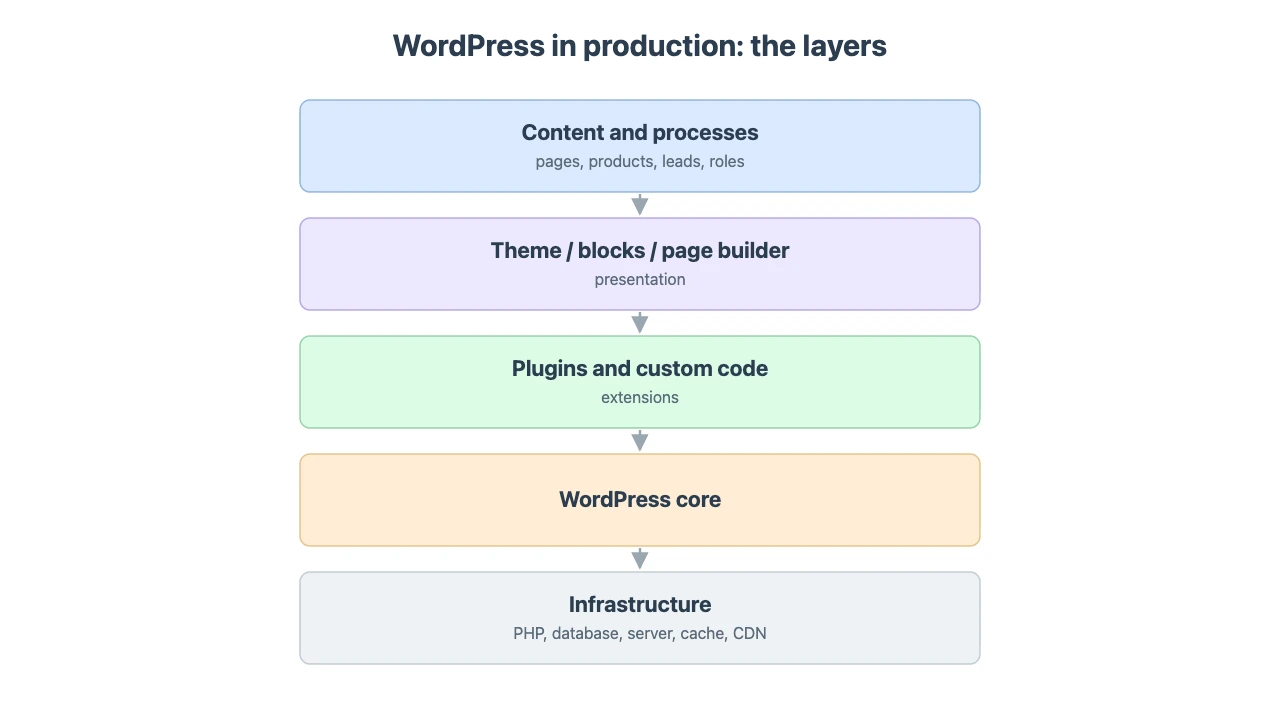
Before choosing, I would look past the fashionable list of pros at a few grounded questions. How often will the site be touched after launch. Who will do it by hand: an editor, a marketer, the owner. How close is the process to a standard one. And separately, how you will live with updates and support. The answers decide the stack far better than any feature comparison.
Pro Tip: Ask a vendor to name the exact plugins they plan to install before work starts. A list of forty is not a feature set. It is future maintenance debt.
WordPress vs Wix, Webflow, Shopify, Squarespace, and custom: which for your business?
First, a distinction that trips up half the comparisons online. WordPress.org is the open-source engine you install and run on your own hosting. WordPress.com is a hosted service built on that engine, with its own plans and limits. When a business says “a site on WordPress,” it almost always needs the self-hosted .org version and a proper host. Write that into the brief on day one, or you will compare the wrong things.
Now the task-by-task version, WordPress for business versus the alternatives. A matrix is useful, as long as you read it as “what fits which job,” not “who is best overall.”
| Task | WordPress | Wix / Tilda / Webflow | Shopify | Custom build |
|---|---|---|---|---|
| Corporate site, blog, SEO hub | Excellent | Good at the start | Not the main use | Expensive for content |
| Quick one-off landing page | Good | Excellent | Good | Overkill |
| Mid-size store | Excellent | Average | Excellent | Expensive without special logic |
| Large marketplace | Proceed with care | Poor | Often better in its own model | Often better |
| A series of mini-sites and landings | Excellent | Good | Average | Expensive |
| SaaS or realtime product | Poor as the core | Poor | Poor | Excellent |
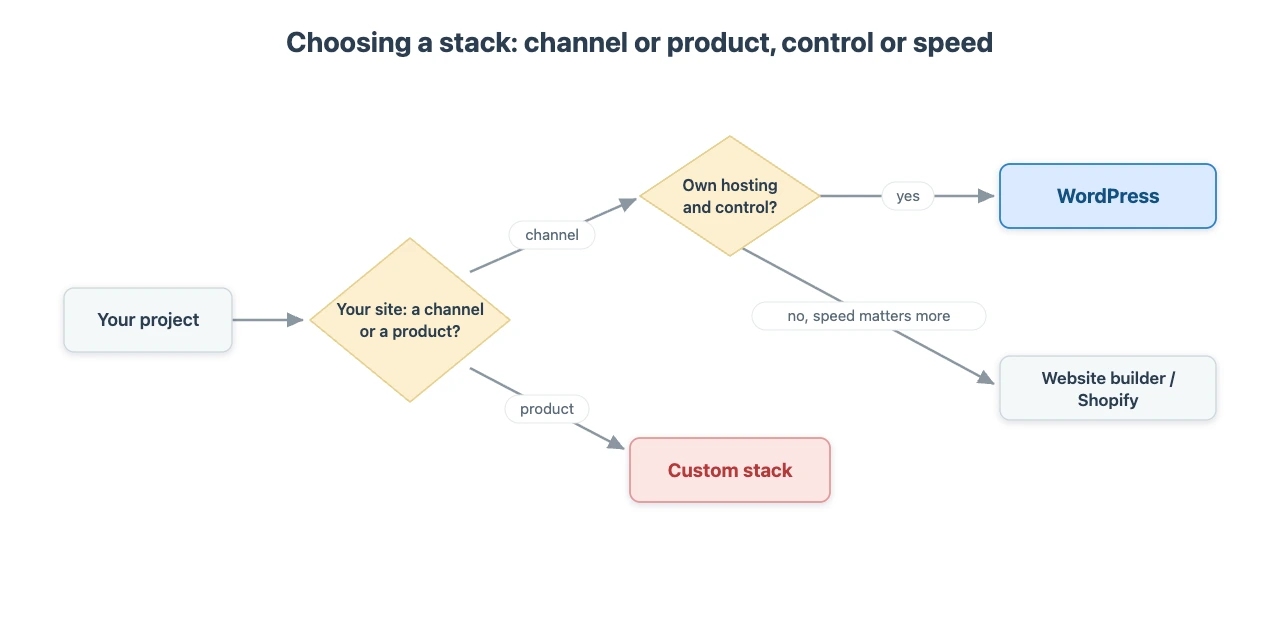
The matrix helps, but “who is cooler” resolves nothing. What matters is the trade-off. Shopify sells less operational complexity in exchange for dependence on the platform: subscription, apps, and rules about leaving. That is a strong offer when the store is the task. WooCommerce sells more control in exchange for more responsibility over hosting, updates, and build quality. For a store as a service with the least headache, Shopify is often the more honest answer. For ownership, non-standard commercial logic, and store-plus-content on one platform, WooCommerce stays the strong candidate.
Webflow and similar builders sell design comfort and a managed platform. The price is a ceiling on custom back-end logic and a harder ownership question. For a fast landing page with no deep engineering, that is frequently the best choice. For a site that will grow integrations and sales rules within a year, it is not. Wix is more direct still: if you need a simple site with no development, it is often the more honest pick than WordPress, and there is no point dragging a self-hosted stack into a job where the business just wants a site that “runs by itself.”
Full custom wins where the site is genuinely the product: complex domain logic, realtime, a separate front-end service, a heavy back end. There, WordPress as the core starts to get in the way.
So why are Shopify and Wix growing in the statistics? Because they answer a narrow question better. “I need a store without the headache.” “I need a simple site without developers.” WordPress answers a wider one: “I need a platform for years, where I can add functions without rebuilding the foundation.” A narrow scenario rewards a narrow tool. A scenario that spreads over time, the usual story for a growing business, is where WordPress earns back its maintenance cost.
When WordPress is the wrong choice
I would not recommend WordPress as the core of a complex SaaS, a realtime product, or any system where content is a side effect. This is the section none of the twenty articles I read while researching actually wrote, so I will. Dragging a product onto WordPress just because the team is used to the admin panel is bad economics. Sometimes a heavy back end (Laravel, for example) sits alongside it for the complex calculations and large store scenarios, and WordPress stays the storefront and the editorial admin while the logic lives outside. That is a different team and a different budget, and it is fine when the task really is that.
Of the risks that genuinely hit a business, I see a few most often.
Updates and security. When a WordPress site gets breached, the cause is usually old plugins, weak passwords, and no staging environment, not a “leaky core” by itself. Blaming the core is comfortable and almost always wrong.
Plugin hell. Ten convenient little additions can cost more than one careful piece of custom code. Flexibility creates its own danger: the platform allows almost anything, and without discipline a project turns into a pile of dependencies. A year later nobody remembers why half the list is installed, and every update becomes a lottery.
Page-builder lock-in. If the whole site is one enormous builder document with no content structure underneath, the redesign will be expensive.
The wide quality range of WordPress builders. A large market of specialists means a large spread of quality. The defense is not a better plugin, it is criteria written into the brief. Real environments, staging, no editing on production through a file manager, a documented update plan. A WordPress build lives or dies on those.
Pro Tip: Put the boring words in the brief. Staging environment. No edits on production through the file manager. A scheduled update plan. The theme is the part clients look at. These are the parts that keep the site alive.
And one more honest line. If a business will not think about updates, hosting, and technical support at all, a managed SaaS like Wix or Shopify can be more rational than self-hosted WordPress. I am not going to defend WordPress where a competitor genuinely wins. The point of an honest guide is to say that plainly.
Where the economics actually work: four real builds
This is the part no comparison article has, because it requires actually shipping the work. These are four real Meduzzen builds, and the site you are reading this on runs on the same stack.
meduzzen.com
Our own site had the fork every corporate site hits. It has to stay comfortable for the editorial team while carrying custom entities, animations, and external integrations, including an AI voice bot, without moving to a separate CMS or a hand-written admin. Services, industries, projects, vacancies, reviews, multilingual content: that is a living company structure, not “five pages and a form.” Solve it with pure custom and you start writing a CMS. Solve it with a rigid builder and the non-standard part does not fit the platform’s model.
We built it on WordPress. A custom theme, our own widgets, the standard contour for forms, SEO, and caching. The typical work went to the platform. The non-standard part, including the voice scenario, we kept in real code, not in “one more builder button.” The signal for a business: WordPress coexists calmly with modern integrations, as long as those integrations live in proper code. The editors work in the admin they already know, and the company structure grew incrementally, without us writing a CMS from scratch.
The honest cost is performance discipline. A storefront with many animations, scripts, and external services means you budget performance separately, or the savings on development get eaten by a slow first screen. WordPress is not slow by nature. A specific build is slow, or is not.
AirSpice
AirSpice is a store for one locale, Bulgaria. It shows clearly that a local market is not a matter of translating interface strings. Deliveries, payment scenarios, the way sums are formatted, and other small rules have to be adapted, or the store feels foreign to the buyer. This is the class of task where a store “out of the box” almost works, and almost always misses the last few percent.
The frame was WooCommerce and Elementor, with a custom widget plugin and pointed fixes for the locale on top. The ready store contour covered the catalog, the cart, and basic commerce. WooCommerce shows its strength here: you stand up a store fast, then grow it into a specific country and process without touching the foundation. Growing it, not migrating it, when the local rules turn out a little more complicated than the demo.
Berggold
For the German chocolate brand at heinerle-berggold.de (see the Meduzzen project page), standard WooCommerce did not cover the sales rules. It needed custom coupon logic. Fees and shipping cost had to be calculated by categories of address: islands get a different fee and a different delivery cost. And the site had to look like a design product, not an assembly of a catalog theme.
This is the moment where it is easy to make an expensive decision out of engineer’s pride: the rules are non-standard, so let us write the store ourselves. It sounds logical until you break the system into parts. Catalog, cart, checkout, account, emails, payment integrations: all of that is solved by thousands of stores already. The specific part is a few percent: coupons, fees, islands. No sense rewriting the entire commercial contour because shipping to the islands is different.
So we kept WooCommerce as the store skeleton. The non-standard rules and the visual identity went into a custom theme and pointed code. The payment, delivery, and admin ecosystem stayed intact, and the unique sales rules live next to a ready frame instead of demanding a separate commerce platform “because we have islands.” Buy ready-made for the standard, write your own for the different. That is the whole philosophy.
B2B client mini-sites
A separate layer is mini-sites and landing pages for clients in tech and B2B: promo pages, ebooks, surveys, solution presentations. Names stay private. Each one is usually a custom theme built to the client’s brand guidelines, plus a reusable library of widgets: features, tabs, forms, advantage sections. The edit cycles from the client’s marketing team are short, and the animation requirements are sometimes strict.
After launch, the text, blocks, and calls to action keep moving. Nobody wants to touch a static HTML file two weeks later. You need an admin and managed components, not a one-off file that becomes archaeology after release.
The economics here are repeatability. The first custom block set is expensive: you are designing the components, their settings, and their limits. The fifth site reuses the accumulated library, so the team does not start from an empty src folder, and onboarding and the next similar build get cheaper because the skill and the parts stay in one ecosystem. It is cheaper to maintain several similar sites on one stack than to build a unique front every time.
Put those four together and one picture appears. On a single platform you can cover very different levels of site maturity, from a tidy storefront to a deeply wired commercial process, without changing the foundation each time the task gets harder. Not because it is the done thing. Because the typical 80% is already handled, and the custom work goes only where the business genuinely differs from the template.
What changed in 2026
WordPress 7.0 shipped in May 2026 with Connectors, the WP AI Client, and progress on the Abilities API. Real-time collaboration was cut from the release when its quality did not hold up. To me that is less a headline feature and more a sign that the core keeps building the ecosystem’s infrastructure and is getting more grown-up about what it ships.
For a business, this is not the main reason to choose WordPress, and I would be suspicious of anyone selling it that way. The AI layer does not make a site smart by itself. It gives infrastructure to plugins and processes. The profitable choice still rests on the economics of change, on ownership, and on the boundaries of the task. Not on a press release about neural networks.
Bottom line
For a typical WordPress for business project, a corporate site, a content hub, or a mid-size store, the question is not whether you can build it on WordPress. Almost always, you can. The question is whether it will be cheaper and simpler to live on for the next few years.
I choose WordPress when a site needs a managed life after release, when it will be changed by the hands of an editorial team, and when it will occasionally grow something non-standard without a change of foundation. I do not choose WordPress when the site is really a complex application only pretending to be a site. Not magic. Not religion. A working stack, if you assemble it as engineering rather than as a pile of plugins.
If that first description sounds like your site, this is the work we do at Meduzzen every day, at Eastern European rates (senior WordPress engineering in this region runs roughly $45 to $70 an hour against $100 to $150-plus in the US, per Arc.dev and GoodFirms 2026 benchmarks). We build on WordPress in production. This site, and the client stores above, run on it. If you want a sober read on whether WordPress fits your case, book a call. That is a conversation I am always open to.
FAQ
Is WordPress good for small business?
Usually yes, as long as the site will change after launch and someone on the team will edit it. WordPress for small business earns its keep when marketing can publish and update content without a developer. If you want a truly hands-off site and will never touch hosting or updates, a managed builder like Wix can be the more honest fit.
WordPress vs Wix, which is better for a business site?
Wix wins on speed and simplicity when you need a small site with no development and no growth plans. WordPress wins when the site has to grow, hold real content, and stay editable by your team, and when you want to own the code and data. The cost curves cross over time: Wix is cheaper to start, WordPress is often cheaper to live on once the changes pile up.
WordPress vs Shopify for an online store?
If the store is the whole business and you want the least operational headache, Shopify is frequently the more honest choice: subscription, apps, done. WooCommerce on WordPress wins when you need non-standard sales logic, ownership of the data, or the store and a content site on one platform. Our Berggold and AirSpice builds are exactly that case: standard commerce out of the box, custom rules written on top.
WordPress vs Squarespace?
Squarespace is a closed, design-first, hosted service that is pleasant for simple, good-looking sites with little back-end logic. WordPress is an open engine you control, better suited to sites that will grow features, content, and integrations. The trade is Squarespace’s convenience against WordPress’s ownership and ceiling.
WordPress.com vs WordPress.org, which does a business need?
WordPress.org is the open-source engine you install on your own hosting, with full control of code, plugins, and data. WordPress.com is a hosted service built on that engine, with its own plans and limits. A business site almost always wants self-hosted .org plus a proper managed host.
Is WordPress worth it in 2026?
For sites that need a managed life after launch, yes. Its share dipped to 41.2% of all sites and 59.1% of known-CMS sites (W3Techs, July 2026), but the ecosystem around it, hosting, plugins, and people who can maintain your site, is still the largest by a wide margin, and that lowers your long-term risk and cost. It is not worth it as the core of a complex application.
How much does a WordPress business site cost to run, not just build?
Plan for the operating cost, not the sticker. A mid-market corporate site around 100,000 visits a month typically runs managed hosting near $109 to $115 a month (WP Engine Growth, Kinsta Business), $350 to $600 a year in plugin licenses, and a maintenance retainer around $1,000 to $2,000 a month. On a $35,000 to $55,000 build, that puts first-year total cost of ownership near $50,000 to $80,000 (WP Engine, Kinsta, Codeable, 2026). WooCommerce adds licenses and transaction fees on top.
When is WordPress the wrong choice?
When the site is really a complex SaaS or realtime product where content is a side effect, when you will not maintain updates and hosting at all, or when the whole thing is one page-builder document with no structure underneath. In the first case, use a custom stack. In the second, a managed SaaS is more rational. In the third, fix the brief before you fix the platform.
Recommended
- Custom WordPress Development in 2026: Cost, Timeline, and the AI Question. The companion piece. This article is the platform-decision guide. That one goes deep on custom-development cost and the AI question. Read them together.
- WordPress development services at Meduzzen: how we build and maintain WordPress sites, stores, and integrations in production.
- Hire a WordPress + AI development team: the engineers behind the builds in this article, including the AI voice-bot integration on meduzzen.com.